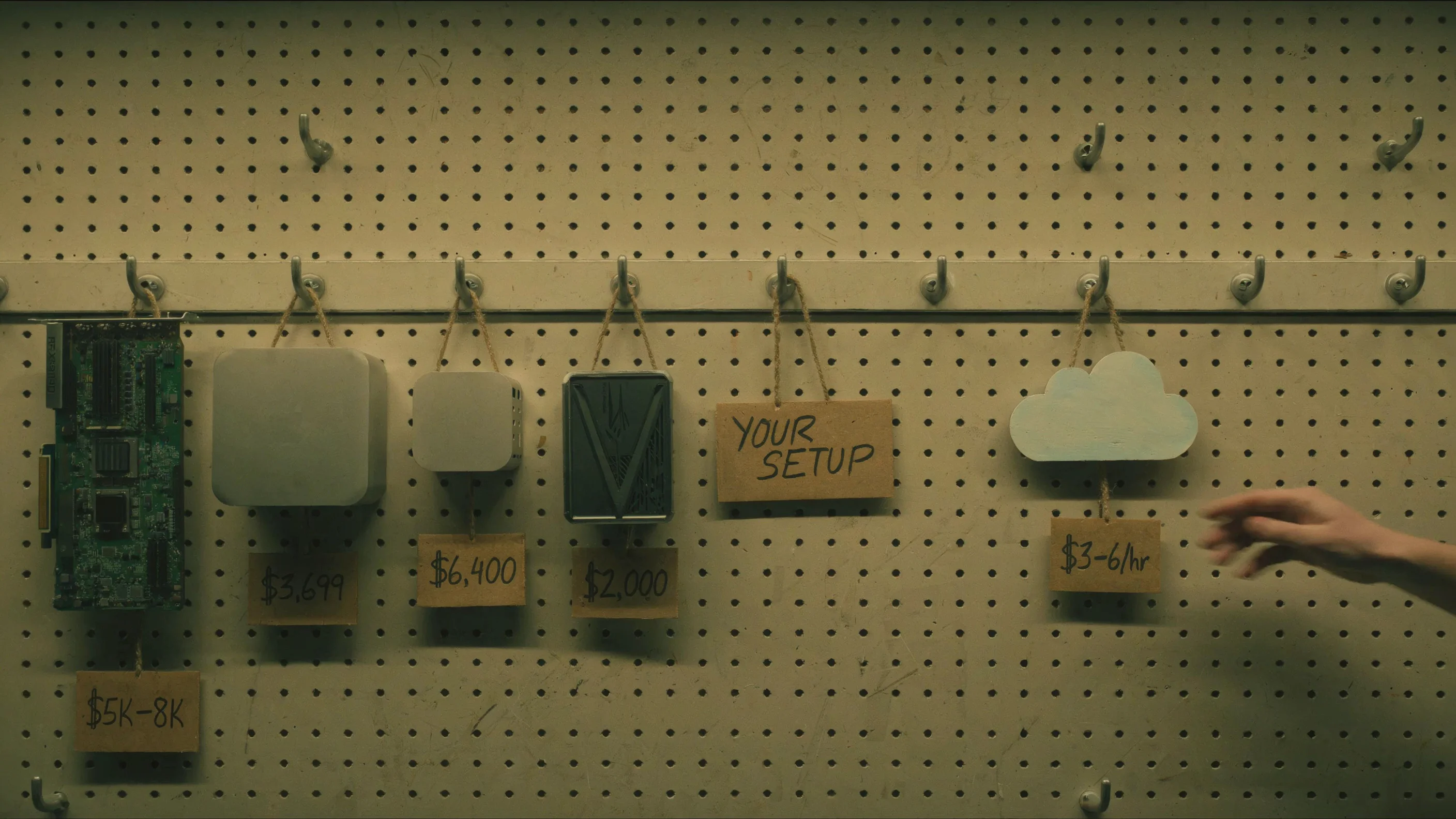
I just published a piece on why NVIDIA’s product segmentation created this market.[1] This is the practical companion. No thesis, no structural argument — just what works, what doesn’t, and what it costs. All prices in USD as of April 2026; EUR and GBP prices are roughly comparable at current exchange rates. I’ll update this guide quarterly.
A GPU is not a computer. Every NVIDIA recommendation below assumes a workstation around it. Prebuilt single-GPU RTX 5090 systems run $5,000 to $8,000 complete — often cheaper than the GPU alone at street prices.[2] Professional workstations cost more. Dual-GPU builds start around $7,600. Apple and AMD mini PCs are complete systems; NVIDIA GPUs are not. I’ll state total system costs throughout.
Software.For inference: Ollama or LM Studio on Apple Silicon (both wrap llama.cpp’s Metal backend; Ollama is adding MLX). Ollama or llama.cpp with CUDA on NVIDIA single-GPU. vLLM for multi-GPU serving. For training: Unsloth (built on Hugging Face’s TRL and PEFT ecosystem) on CUDA; mlx-lm for LoRA, QLoRA, and full fine-tuning on Apple Silicon. Download GGUF models from Hugging Face Hub for Ollama and llama.cpp; safetensors for vLLM and transformers. All model sizes in this guide assume Q4_K_M quantization — the standard, quality-optimized 4-bit format — unless otherwise noted.
Inference
Inference is memory-bandwidth-bound. The hardware that generates tokens fastest is the hardware that reads model weights from memory fastest. Capacity determines which models you can run. Bandwidth determines how fast they run.
Under 30B: RTX 5090
Nothing touches it. 32 gigabytes of GDDR7 at 1,792 GB/s.[3] A dense 30B model fits and runs at 60 to 90 tokens per second at short to moderate context — the bandwidth ceiling for 32B Q4 decode is about 94 tok/s. Speeds drop at longer context as KV cache competes for bandwidth. MoE architectures are dramatically faster: Hardware Corner measured a 30B MoE at 234 tok/s because only 3B active parameters are read per token.[3] If your workload fits in 32 gigabytes, buy this and stop reading. At long context (64K+), KV cache grows fast — verify that model weights plus KV cache fit before committing. $3,500 to $4,800 at current street prices; the DRAM shortage has made these hard to find. System cost: $5,000 to $8,000.[4] If 24GB is enough for your models, a used RTX 4090 at $1,500 to $2,200 remains the best-value NVIDIA card — 1,008 GB/s bandwidth, mature CUDA support, and a total system cost under $4,000.
70B: Mac Studio M4 Max
The 70B sweet spot. 128 gigabytes of unified memory at 546 GB/s.[5] A Q4 Llama 3.3 70B runs at 8 to 15 tokens per second — closer to 15 at short context, dropping toward 8 at longer conversations. Speculative decoding with a small draft model can roughly double effective throughput in llama.cpp, though results depend on how well the draft model matches the target. $3,499 with 512GB SSD, $3,699 with 1TB (the practical minimum for storing multiple large models).[6] Complete system — plug in power and a display, and you’re running. The M3 Ultra (819 GB/s, starting at $3,999 for 96GB) is faster per token, but the M4 Max is the value pick at this tier. Most practitioners use llama.cpp’s Metal backend via Ollama or LM Studio. Ollama is transitioning to an MLX backend, with a preview showing 57% faster prefill and 93% faster generation on supported models.[7]
70B on a budget: Mac mini cluster
Four Mac Mini M4 Pro units (48GB each) connected via Thunderbolt 5 pool 192 gigabytes of shared memory for $6,400 to $7,200.[8] EXO Labs demonstrated Nemotron 70B at 4-8 tokens per second and Qwen2.5Coder-32B at 18 tokens per second on M4 Pro clusters.[9] The entire cluster draws about 200 watts under full load — less than a single RTX 5090. The catch: you need direct Thunderbolt 5 cable connections between nodes (no TB5 switches exist yet), and inter-node latency makes this better suited for batch inference than interactive chat. macOS 26.2’s RDMA support drops inter-node latency from about 300 microseconds to under 50, but that’s still orders of magnitude slower than on-chip memory access.[10] If your budget is $7,000 and you want 70B inference with room to grow, a cluster is viable. For the best single-machine experience at 70B, the Mac Studio M4 Max at $3,699 is still the answer.
70B with CUDA: RTX PRO 6000
The CUDA answer to the 70B tier. 96 gigabytes of GDDR7 at 1.8 TB/s — nearly identical bandwidth to the RTX 5090 but with three times the VRAM.[11] A 70B Q4 model fits on a single card with over 50GB of headroom for long context and concurrent users. For team serving (4+ users via vLLM), that headroom matters — each concurrent user at 8K context adds 2-4 gigabytes of KV cache.
No NVLink — dual-card setups communicate over PCIe Gen 5. A dual PRO 6000 gives you 192GB total for running 70B in FP16 or fitting very large models, but the PCIe interconnect creates the same bottleneck as dual 5090s for cross-GPU workloads. A single-card PRO 6000 avoids the bottleneck entirely and handles 70B Q4 with room to spare.
A complete single-GPU professional workstation runs about $22,000; a dual-GPU one, about $30,000 to $33,000.[12] At these prices, the honest comparison is a year of B200 cloud time. Buy a PRO 6000 if you need always-on 96GB CUDA locally — for team inference, compliance-constrained training, or workflows where cloud latency or data residency rules it out.
Multi-GPU NVIDIA (no NVLink)
Dual RTX 5090 (64GB).Two RTX 5090s give you 64 gigabytes of VRAM and access to vLLM’s tensor parallelism over PCIe.[13] NVLink was last available on the RTX 3090; the two GPUs communicate over PCIe x8/x8, a bottleneck for large models. A 70B Q4 model fits in 64GB but runs at a pace comparable to or slower than a single Mac Studio M4 Max — per-layer PCIe synchronization overhead eats up the raw bandwidth advantage. Where dual 5090s shine is inference on 30 to 40B models that benefit from parallelism, or training (see below). System cost: $9,000 to $12,000, or $7,600 for prebuilt GPUs at list price.[14]
200B+: Mac Studio M3 Ultra
Still the current Ultra — Apple skipped the M4 generation. 256 gigabytes at 819 GB/s. Llama 3.1 405B fits in Q4 (~235 GB). DeepSeek V3 671B fits only at aggressive quantization (1.5-2-bit dynamic quants via Unsloth, ~192-226GB) — functional but with measurable quality loss.[15] About $5,999 on the base chip with 1TB SSD. The M5 Ultra is expected mid-2026 with potentially 1,200+ GB/s bandwidth — if you can wait two to three months, wait.[16] Jeff Geerling tested a four-unit M3 Ultra cluster connected via Thunderbolt 5 RDMA, pooling 1.5 terabytes of unified memory and running large MoE models at 28 to 32 tokens per second.[17] macOS 26.2 enables RDMA natively, though clusters max out at four units in a full mesh (no TB5 switches).[18] Apple recently removed the 512GB option and raised the 256GB upgrade price from $1,600 to $2,000 — a signal of a DRAM shortage.[19]
Budget and niche
AMD Strix Halo.128 gigabytes for $2,000 in a mini PC.[20] Bandwidth is lower (212 GB/s measured), which makes dense 70B models painfully slow at 3 to 5 tokens per second. But Mixture-of-Experts models change the math: Llama 4 Scout (109B total, 17B active MoE) manages an estimated 10 to 20 tokens per second.[21] Vulkan via llama.cpp now outperforms AMD’s own ROCm on Strix Halo.[22] If you’re on a budget and your workloads are MoE-heavy, this is the most memory per dollar you can buy.
DGX Spark.128 gigabytes of LPDDR5x, 273 GB/s, $4,699.[23] Hard to recommend for most practitioners. For inference, a Mac Studio M4 Max delivers twice the bandwidth at a lower price. For training, a PRO 6000 is faster, and the cloud is cheaper — $4,699 buys over 900 hours of B200 time. The Spark’s only defensible use case is always-on, locally 128GB of CUDA when the cloud is not an option (air-gapped environments, compliance constraints, or workflows that require continuous local iteration at 70B+ model scales). The EXO Labs hybrid setup (Spark for prefill, Mac Studio for decode) showed a 2.8× speedup on an 8B model, but 70B+ results have not been published.[24]
Coming soon
The Mac Studio M5 Ultra is expected in mid-2026, potentially with 1,200+ GB/s and up to 256GB.[16] AMD’s Strix Point is also expected to be released late 2026 with improved bandwidth. The rumored RTX 5090 Super with 48GB GDDR7 would change the NVIDIA story at the 70B tier — but the DRAM shortage makes a 2026 launch unlikely.
Training: Supervised Fine-Tuning (SFT)
SFT — training a model on input-output pairs to follow instructions, adopt a style, or learn a domain — is the most common local training task. Memory scales with model size, quantization, and method: full fine-tuning loads the entire model and its optimizer states; LoRA freezes most weights and trains small adapter layers; QLoRA additionally quantizes the frozen weights to 4-bit — cutting VRAM by 60-80%.
8B to 40B: RTX 5090
QLoRA fine-tuning of an 8B model takes 7 to 16 gigabytes of VRAM with Unsloth depending on LoRA rank, context length, and batch size — 7GB at rank 16 with short context, 14 to 16GB at rank 64 with 8K context.[25] Unsloth’s “full fine-tuning” mode — all parameters trained, but base weights stored in 4-bit — uses 20 to 24 gigabytes, which is workable on 32GB.[25] Traditional FP16 full fine-tuning of 8B (model + AdamW optimizer states + gradients) needs 48 to 64 gigabytes and does not fit on a single 5090. Unsloth’s Blackwell-optimized kernels deliver about 2× the training speed of standard implementations.[26] System cost: $5,000 to $8,000.
NVIDIA’s own benchmarks show QLoRA fine-tuning of models up to 40B parameters on a single RTX 5090.[27] Full SFT of 40B does not fit in 32GB. This is the ceiling for single-GPU consumer SFT.
50B to 70B: PRO 6000, dual 5090, or cloud
A single PRO 6000 with 96 gigabytes can QLoRA a 70B model at about 38 gigabytes peak VRAM — about 4 hours for a standard fine-tune.[28] The DGX Spark’s 128GB also handles 70B QLoRA, though lower bandwidth makes it 30-50% slower, and at $4,699, a cloud GPU is cheaper unless you need to stay local. Full SFT of 70B requires about 300GB total (model weights, AdamW optimizer states, and gradients) — cloud only (2× H100 80GB with DeepSpeed ZeRO-3, or a single B200).[29] If you don’t own a PRO 6000 (a complete professional workstation runs about $22,000), renting a cloud GPU for a few hours is cheaper for occasional fine-tuning.
Two 5090s (64GB combined) with DeepSpeed ZeRO can train QLoRA models up to 50-60B — beyond the single-GPU ceiling but limited by PCIe interconnect overhead. Not practical for full SFT of 70B (optimizer states don’t fit). System cost: $9,000 to $12,000.[30]
Apple Silicon and AMD
MLX LoRA.It works. mlx-lm supports LoRA and QLoRA natively.[31] The 128 to 256 gigabytes of unified memory on a Mac Studio lets you load larger SFT models than any consumer NVIDIA card. The ecosystem is thinner: no Unsloth (yet — “coming very soon”), no DeepSpeed. If your workflow is LoRA on a custom dataset, MLX handles it well. If you need GRPO, DPO, or the latest training techniques, you need CUDA.[32]
AMD.Functional but not recommended as your primary path. ROCm supports PyTorch training, and Unsloth offers AMD compatibility through its Core library. The driver-kernel maturity gap means more debugging than training.[33]
Training: Reinforcement Learning (GRPO, DPO)
RL fine-tuning is harder on hardware than SFT. GRPO (the technique behind DeepSeek R1) generates multiple completions per prompt, scores them, and updates the policy model — requiring 1.5 to 2× the memory of equivalent SFT because the model must hold both the policy weights and the generated sequences simultaneously. DPO loads a quantized reference model alongside the training model, adding 2-4 gigabytes to an 8B model with modern implementations. Both require CUDA for production-quality training as of April 2026 — TRL’s DPO trainer technically runs on any PyTorch backend, including ROCm, but optimization and stability are not there yet for serious workloads.
8B to 30B: RTX 5090 or cloud
GRPO on an 8B model via Unsloth uses 14-18 gigabytes — well within the 5090’s 32GB.[34] DPO on 8B is similar. This is the entry point for local RL. System cost: $5,000 to $8,000.
GRPO on a 14B model pushes into 22-28 gigabytes, leaving the 5090 with little headroom for longer sequences. A 30B GRPO run may not fit at all depending on sequence length and batch size. The DGX Spark’s 128GB handles 30B GRPO with room to spare — but a cloud B200 does it faster and cheaper unless you’re running these jobs frequently enough to justify the $4,699.[35]
70B: PRO 6000 (marginal) or cloud
GRPO or DPO on 70B needs 80-100 gigabytes for the policy model, generated sequences, and optimizer states. No consumer device handles this. A single PRO 6000 (96GB) may fit 70B GRPO at the lower end of that range, but has no headroom — and at $22,000+ for the workstation, cloud is almost always the better answer. A dual PRO 6000 over PCIe gives you 192GB but adds interconnect overhead, and the price tag becomes astronomical. A B200 (192GB) or 2× H100 (160GB combined) handle it cleanly. Budget $15 to $50 per GRPO run, depending on provider pricing ($3 to $6 per GPU-hour).[36]
Coming soon for training
Unsloth lists “MLX training coming very soon” as of March 2026 — if this ships, Apple Silicon gains GRPO and SFT through Unsloth’s optimized kernels, narrowing the CUDA gap significantly for parameter-efficient methods.[37] On the NVIDIA side, the PRO 6000 with 96GB remains the local SFT limit; for RL beyond 8B, most practitioners are better served by the cloud.
Cloud
For workloads that exceed local hardware — 70B+ full fine-tuning, 70B RL, multi-GPU distributed training, or high-concurrency production inference — the B200 is the default. The discipline that makes cloud work: don’t leave it idle, and don’t use it for debugging.
B200 for training and inference.192GB HBM3e at 8,000 GB/s, with NVLink for multi-GPU scaling. A single B200 handles 70B QLoRA and 70B GRPO; an 8-GPU node handles 70B full SFT. For inference, the B200 delivers up to 4.9× the throughput of a PRO 6000 and wins on cost-per-token despite the higher hourly rate.[38] Pricing: $3 to $6 per GPU-hour on neo-cloud providers, higher on hyperscalers.
The workflow that saves money:get everything ready locally — code, data, configuration, hyperparameters tested on a small model — then ship the job to the cloud. A $5/hour B200 running for 4 focused hours costs $20. The same B200 left idle overnight while you debug a data loading issue costs $120. The difference between a $20 fine-tune and a $500 fine-tune is almost entirely local preparation.[39]
H100 and H200 remain viable.H100 at $2.50 to $3.00 per GPU-hour is adequate for 8B to 30B SFT and RL. H200 at $3.00 to $4.00 per GPU-hour with 141GB HBM3e is the value option for 70B QLoRA when B200 availability is tight.[40]
Providers.RunPod, Lambda, Vast.ai, Together AI, and the hyperscalers all offer B200 and H100/H200 instances. Pricing, availability, and minimum commitments change faster than this guide can be updated. For occasional training jobs, spot instances work. For sustained inference, reserved capacity or on-prem is more economical, which is where the local hardware recommendations above take over.[41]
The asymmetry
The same machine is rarely best for both. The Mac Studio dominates inference because bandwidth is king, and Apple ships more of it per dollar than anyone. The RTX 5090 dominates local training because there’s no equivalent in CUDA's ecosystem. And for anything beyond what fits in 32 or 96 gigabytes of VRAM, the B200 is the default — as long as you treat cloud time as a production resource, not a sandbox.
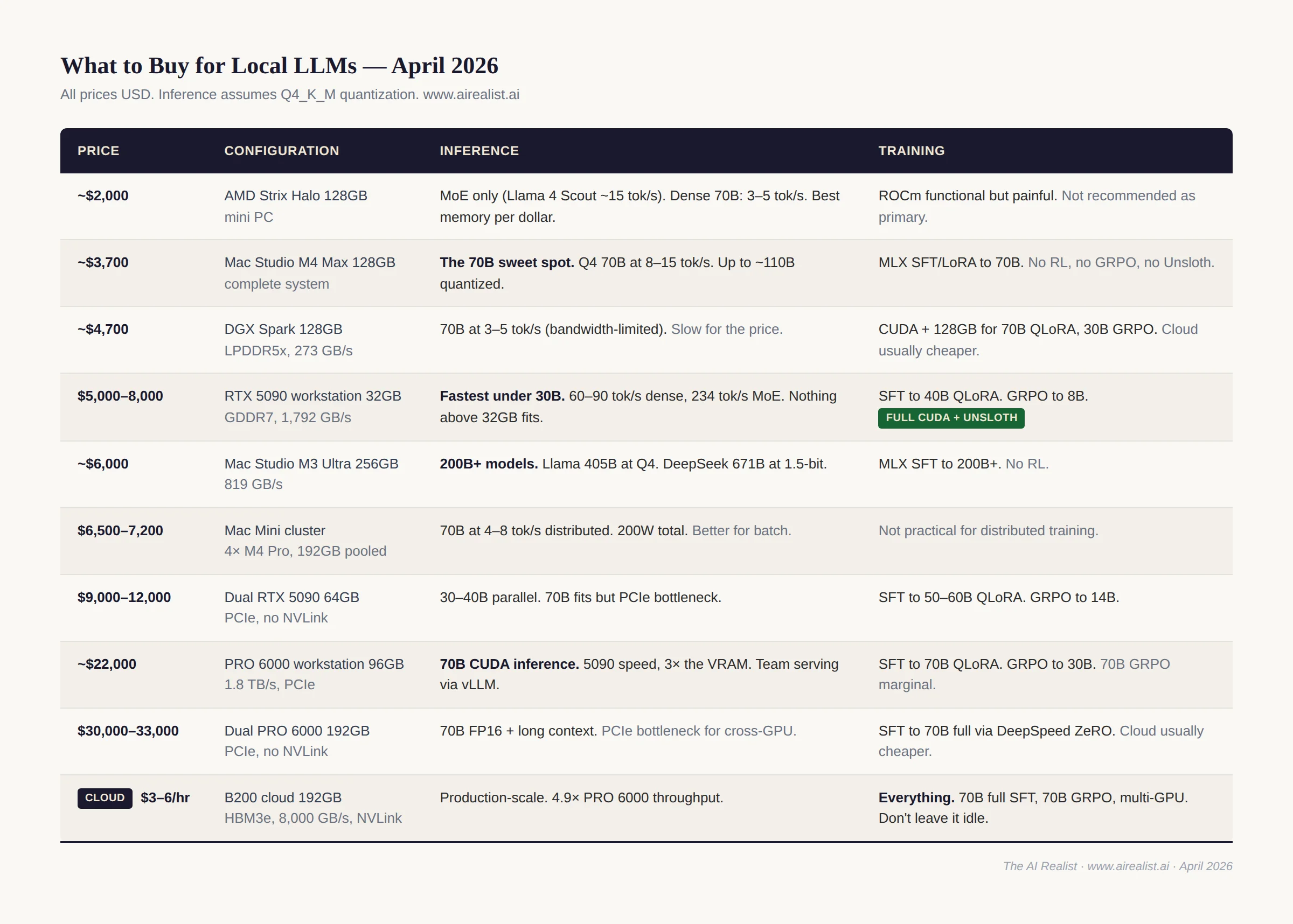
For practitioners who need local, always-on inference, a 128 GB+ Apple Silicon Mac is the best option today. For training, a local GPU will force you to compromise on model sizes and algorithms, and rely on a B200 in the cloud for jobs that don’t fit.
The irony — training on the company whose product segmentation created the inference vacuum, then inferring on the company that filled it — is the subject of the companion piece.[42]
Notes
[1] “Your Parents Paid,”The AI Realist. Paid post.
[2] Prebuilt single-GPU RTX 5090 workstation pricing, April 2026: MSI Aegis $3,599 (sold out — cheaper than standalone GPUs); Skytech $5,300; CyberPower/Maingear $4,400–$5,300; Alienware Area-51 $5,300 (discounted). ArsenalPC MES2X dual RTX 5090 base: $7,602. Professional workstations (Dell Precision, Lenovo ThinkStation) start higher. Sources:Tom’s Hardware;VideoCardz;Petronella AI Workstation Guide.
[3]NVIDIA RTX 5090: 32GB GDDR7, 512-bit bus, 1,792 GB/s. Bandwidth ceiling for decode: 1,792 GB/s ÷ model weight read per token. Dense 32B Q4_K_M (~19GB): ceiling ~94 tok/s. MoE 30B with 3B active (~2GB read): ceiling ~896 tok/s.Hardware Corner RTX 5090 LLM benchmarks(Q4_K_XL via llama-bench): Qwen3 8B at 145–185 tok/s TG, Qwen3 30B A3B MoE at 234 tok/s (4K context) declining to ~110 tok/s (32K), Qwen3 32B dense at 52 tok/s (147K extreme context).LocalLLM.in/RunPod report 213 tok/s on 8B models.
[4] RTX 5090 street prices as of April 2026: Newegg FE at $3,695, Amazon at $3,899, custom AIB models $4,500–4,800 (WCCFTech, BestValueGPU tracker). The DRAM shortage has driven prices well above the $1,999 list price. Prebuilt RTX 5090 workstations: $5,000–8,000 complete.VideoCardznotes that standalone RTX 5090 pricing has approached the cost of entire prebuilt systems. EU: €3,800–5,200. UK: £3,200–4,000.
[5]Apple Mac Studio M4 Max: 128GB unified memory requires the 16-core CPU / 40-core GPU chip variant. 546 GB/s memory bandwidth.
[6] Mac Studio M4 Max 128GB pricing confirmed byPetaPixelreview (March 2025) andB&H Photo(April 2026): $3,499 with 512GB SSD, $3,699 with 1TB SSD. EU: €4,099 / €4,299. UK: £3,599 / £3,799. Build-to-order upgrade from the $1,999 base (36GB).
[7]OllamaMLX preview: March 2026. Performance claims from Ollama blog. llama.cpp Metal remains the current default for most Mac users.
[8]Mac Mini M4 Pro 48GB: $1,599 with 512GB SSD, $1,799 with 1TB. Four units: $6,396–$7,196 plus ~$200 for Thunderbolt 5 cables. The 24GB base ($1,399) is cheaper but limits total pooled memory to 96GB — not enough for 70B. M4 Pro bandwidth: 273 GB/s per node.
[9] EXO Labs Mac Mini cluster benchmarks: Qwen2.5Coder-32B at 18 tok/s, Nemotron-70B at 4–8 tok/s on M4 Pro nodes. Five-node cluster total power: ~200W under full load. Sources: AIBase;Medium/Faizan Saghir(January 2026).
[10] macOS 26.2 RDMA over Thunderbolt 5: inter-node latency ~300μs → under 50μs (Awesome Agents, March 2026). Requires Recovery Mode boot (rdma_ctl enable). No TB5 switches exist — direct cabling only.EXO Labsis the primary clustering software.
[11]RTX PRO 6000 Blackwell Workstation Edition(datasheet PDF): 96GB GDDR7 ECC, 1.8 TB/s bandwidth, PCIe Gen 5 x16. No NVLink support — multi-GPU setups communicate over PCIe only, same bottleneck as dual 5090s. MSRP ~$8,565; retail $8,000–$9,200 as of March 2026. Server Edition: 1.6 TB/s, passive cooling. Also:Thunder Compute;Lenovo Press.
[12] PRO 6000 workstation pricing:APY(France) configures a single RTX PRO 6000 + Threadripper Pro 9965WX + 128GB ECC + 1TB at €20,305 HT (~$22,000). Dual adds ~€8,000 for the second GPU: total €28,000–30,000 HT (~$30,000–33,000). BOXX APEXX T4 PRO-X priced similarly. Cloud comparison: a B200 at $5/hr × 24/7 × 30 days = $3,600/month. The dual PRO 6000 breaks even in 8–9 months of continuous use at these prices.
[13] Dual RTX 5090: the RTX 5090 does NOT support NVLink (removed since RTX 3090). Two GPUs communicate over PCIe. X670E/X870E consumer boards bifurcate to x8/x8 with two GPUs.vLLMsupports tensor parallelism over PCIe for inference;DeepSpeedZeRO supports it for training.
[14] Dual RTX 5090 system cost:ArsenalPCMES2X base at $7,602. At current GPU street prices ($3,500–4,800 each), DIY or custom builds run $9,000–12,000. RTX 5090 TDP: 575W; dual GPUs need 1,500W+ PSU. Consumer AM5 boards bifurcate to x8/x8; Threadripper provides full x16/x16 but adds $4,500+ to CPU cost.
[15] Mac Studio M3 Ultra 256GB: base (28-core, 96GB, 1TB) at $3,999 + $2,000 memory upgrade = ~$5,999. Higher chip (32-core/80-core) adds $1,500. 512GB option discontinued March 2026. GGUF file sizes for DeepSeek V3.1 671B: Q8_0 = 713GB, Q4_K_M = 405GB, Q3_K_M = 320GB, Q2_K = 246GB, UD-IQ1_S = 192GB (unsloth/DeepSeek-V3.1-GGUF). At 256GB, the 671B model requires 1.5 to 2-bit dynamic quantization to fit with room for KV cache and OS. Llama 3.1 405B at Q4_K_M = ~235GB fits comfortably. Also:AppleInsider;VideoCardz.
[16] M5 Ultra: not yet announced. Projection based on M5 Max (614 GB/s on MacBook Pro) and UltraFusion architecture. Expected mid-2026 perMacworld/Bloomberg. M4 Ultra was never released; Apple skipped to M5 Ultra.
[17] Jeff Geerling, “1.5 TB of VRAM on Mac Studio — RDMA over Thunderbolt 5,”jeffgeerling.com, December 2025. Four Mac Studios, 1.5TB total. DeepSeek V3.1 671B at 32.5 tok/s, Qwen3 235B at 31.9 tok/s.
[18] macOS 26.2 RDMA: Requires Recovery Mode boot (rdma_ctl enable). Apple TN3205. No TB5 switches — clusters require direct full-mesh wiring, limiting practical size to four units.
[19] Apple removed the 512GB memory option from Mac Studio in March 2026 and raised the 256GB upgrade price.VideoCardz;MacRumors.
[20] AMD Ryzen AI Max+ 395 (Strix Halo): 128GB LPDDR5x.Framework Desktopat $1,999 (US); ~€2,200 (EU). Also Beelink GTR9 Pro, GMKtec EVO-X2.
[21] MoE performance on Strix Halo: community benchmarks (Hardware Corner GPU ranking,Level1Techs). Llama 4 Scout is 109B total / 17B active per token. At Q4, active weights per token read ≈ 10GB; theoretical max at 212 GB/s ≈ 21 tok/s. Practical speeds with overhead: ~10–20 tok/s. Treat as directional estimates.
[22] AMD Vulkan viallama.cpp: AMD used Vulkan for GTC 2026 DGX Spark comparisons. Community testers confirmed Vulkan RADV outperforms ROCm HIP on Strix Halo.
[23]DGX Spark: 128GB LPDDR5x, 273 GB/s, NVIDIA Grace Blackwell. $4,699 (increased from $3,999 at launch due to memory-shortage surcharge).
[24]EXO Labs, “Combining NVIDIA DGX Spark + Apple Mac Studio for 4x Faster LLM Inference,” October 2025. Measured speedup: 2.8× over Mac Studio alone. Model tested: Llama-3.1 8B — 70B+ not published.
[25]UnslothQLoRA VRAM for 8B: ~7GB at rank 16, batch 1, 2K context; ~12–16GB at rank 64, batch 2, 8K context. Unsloth’s “full fine-tuning” stores base weights in 4-bit but trains all parameters — uses ~20–24GB for 8B. This is NOT traditional FP16 full SFT, which would require ~48–64GB (16GB model + 32GB AdamW states + gradients).NVIDIA Developer Blog, November 2025.
[26] Unsloth Blackwell-optimized kernels: 2× training speed vs standard implementations.NVIDIA Developer Blog, November 2025.
[27] “Fine-tune models with as many as 40 billion parameters on a single Blackwell GPU.”NVIDIA Developer Blog, November 2025. QLoRA on all linear layers.
[28] Spheron benchmark: QLoRA fine-tuning of Llama-3.1 70B at 38GB peak VRAM. ~4 hours on A100 80GB; PRO 6000 (96GB) should be comparable.Spheron blog, February 2026.
[29] Full SFT of 70B in FP16: ~300GB total (model + optimizer states). Requires 2× H100 80GB withDeepSpeedZeRO-3, or a single B200. Cloud is the practical option.
[30] Dual RTX 5090 for training:DeepSpeedZeRO Stage 2/3 enables model sharding over PCIe. QLoRA on 50–60B feasible; full SFT of 70B is not. PCIe x8/x8 creates ~15–30% throughput penalty vs NVLink.
[31]mlx-lmsupports LoRA, QLoRA, and full fine-tuning. Also supports distributed fine-tuning via mx.distributed.
[32] MLX SFT limitations as of April 2026: noUnslothintegration (”coming very soon”), no DeepSpeed. SFT and LoRA work well. The 128–256GB unified memory on Mac Studio enables SFT on larger models than any consumer NVIDIA card.
[33] AMD ROCm training:Unsloth Coresupports AMD GPUs. PyTorch + ROCm is functional. Community reports 10–20% more debugging overhead vs CUDA.
[34] GRPO on 8B viaUnsloth: ~14–18GB (model + generated sequences + optimizer states). Fits on RTX 5090 with headroom.MarkTechPost, March 2026.
[35] DGX Spark for RL: 128GB allows GRPO on models up to ~30B.UnslothDocker supports Spark natively (CUDA 12.x, PyTorch,TRL, GRPO). Bandwidth limitation (~273 GB/s) slows throughput vs PRO 6000, but memory capacity enables model sizes the 5090 cannot touch.
[36] 70B GRPO memory requirement: policy model (~38GB in 4-bit), generated sequences, optimizer states, gradient buffers. Total: 80–100GB depending on sequence length and batch size. B200 (192GB) handles this on a single GPU. 2× H100 (160GB combined) is the alternative. At $3–6/GPU-hr (neo-cloud), a 4–8 hour GRPO run = $12–48.
[37]Unsloth Studio changelog, March 2026: “macOS: Currently supports chat and Data Recipes. MLX training is coming very soon.”
[38] B200 (192GB HBM3e on SXM5; some providers list 180GB variants): 8,000 GB/s bandwidth. CloudRift benchmarks (February 2026): up to 4.9× RTX PRO 6000 throughput in 8-GPU configurations. Pricing as of April 2026:RunPod$4.99/GPU-hr on-demand;Spheron$6.03 on-demand, $2.18 spot;Lambdaand neo-cloud providers $3–6/GPU-hr; hyperscalers (AWS, GCP, Azure) $6–12/GPU-hr on-demand. Average across 22 providers: $4.76/GPU-hr (getdeploying.com).
[39] The local-then-cloud workflow: test on a small model locally (8B on RTX 5090, or reduced batch on Apple Silicon), verify end-to-end, then scale on cloud hardware.
[40] H100 SXM: ~$2.50–3.00/GPU-hr. H200: ~$3.00–4.00/GPU-hr. H200 delivers 1.8–2.1× H100 throughput on long-context inference. CloudRift benchmarks.
[41] Provider comparison changes faster than this guide. Current pricing:RunPod,Lambda,Vast.ai,Together AI.
[42] “Your Parents Paid,”The AI Realist.